Architecture
Selfbrowse is one loop with a browser on one side and a model on the other. Everything else exists to control what crosses from the first to the second.
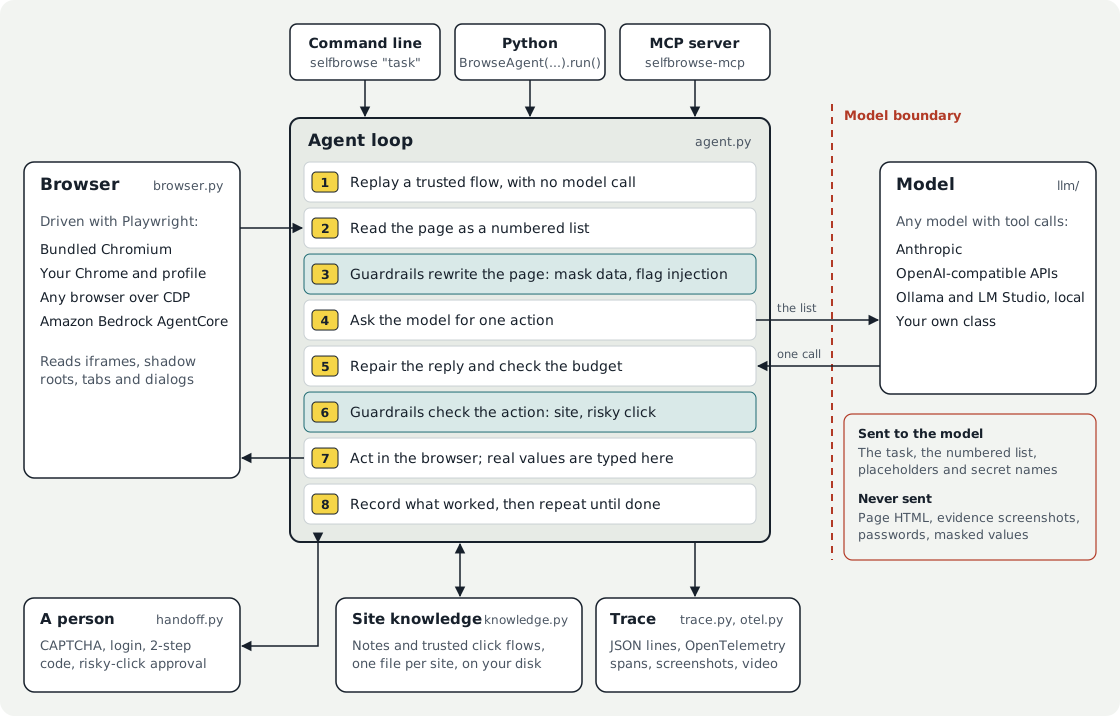
One step of the loop
The loop lives in agent.py (BrowseAgent._loop). Each pass does the following, in this order.
- Replay a trusted flow. If site knowledge holds a trusted click sequence for this page type, the clicks run with no model call. Each replayed click still passes the guardrails; if one objects, or the element cannot be found, the replay stops and the model takes over.
- Read the page.
Browser.snapshot()returns a numbered list of what is usable in the viewport, up to 120 controls, including those in iframes and open shadow roots. If the page looks like a bot check, the loop pauses for a person before going on. - Guardrails rewrite the page. Each guardrail's
on_pagehook sees the list before the model does. This is where personal data becomes placeholders such as<EMAIL_1>and where instruction-like page text is flagged. - Ask the model. The request holds the system prompt, the tool schemas, the task and the conversation. Only the newest page list is kept, along with the two most recent
readresults; older ones are trimmed first. - Repair the reply and check the budget. A tool call written as text, a wrong argument name or an unknown tool is fixed or answered with what to send. Budget guardrails (
after_step) stop a run that has gone over. - Guardrails check the action.
check_urljudges where agotowould land, andbefore_actionjudges the click or typing. A guardrail can block the action, or ask a person to confirm it. With nobody to ask, a confirmation becomes a block. - Act in the browser. The tool runs through Playwright. This is the only point where real values exist:
<secret:NAME>and<EMAIL_1>are swapped for the real text as it is typed, and a placeholder is refused on any site it was not seen on. - Record what worked. A click that opened another page or dismissed a banner is noted for this page type. The notes are written to disk only if the run succeeds.
The run ends when the model calls done, a guardrail stops it, the step limit is reached, or a person declines a hand-off.
The model boundary
The red line in the diagram is the reason for the design.
| Sent to the model | Never sent |
|---|---|
| The task text | Page HTML |
| The numbered list for the current page | Evidence screenshots and video (--screenshots, --record-video) |
Text from read and find, after masking |
Secret values; the model sees only <secret:NAME> |
Placeholders such as <EMAIL_1> |
The values behind placeholders |
| Saved notes about the site | What a person types or sees during a hand-off |
Two limits apply. Page text that no guardrail masks is sent as it appears, so a hosted model does see it; only a local model keeps page content on your machine. And masking is pattern matching, so it lowers exposure and does not prove that nothing leaked. See Personal data.
Modules
| Module | What it holds |
|---|---|
agent.py |
BrowseAgent: the loop, reply repair, loop guards, hand-off, replay and learning hooks |
browser.py |
Browser: Playwright wrapper, the page snapshot, tabs, dialogs, frames, CDP attach |
tools.py |
The tool schemas sent to the model, and the repair of sloppy tool calls |
prompts.py |
The system prompt and the context-trimming constants |
guardrails.py |
The Guardrail base class, the built-in guardrails, and the placeholder vault |
knowledge.py |
SiteKnowledge: per-site notes and click flows, and the trust rules |
handoff.py |
Bot-check detection and the terminal prompt for a person |
llm/ |
The LLM protocol, the Anthropic client, and the OpenAI-compatible client with its JSON mode |
trace.py, otel.py |
Tracer, the trace file format, the timeline renderer, and the OpenTelemetry sink |
cloud.py |
Remote browser adapters (CloudBrowser), including Amazon Bedrock AgentCore |
cli.py, mcp_server.py |
The two command line entry points |
Where you can plug in
Each of these is a small interface, so none needs a change to the loop.
| To change | Provide | Read more |
|---|---|---|
| The model | An object with model and complete(system=, messages=, tools=, max_tokens=) |
Models |
| What is allowed | A Guardrail subclass overriding on_page, check_url, before_action or after_step |
Guardrails |
| How a person is asked | A handoff= function that takes a request and returns True to continue |
CAPTCHAs and hand-off |
| Where traces go | A sink with handle(event) and close(), or redact_trace= to scrub text |
Observability |
| Where the browser runs | A CDP address, or a CloudBrowser with open() and close() |
Remote browsers |
The MCP server
selfbrowse-mcp wraps the same parts in two ways.
- Task mode (
browse(task)) runs the whole loop above with the server's own model and returns only the answer. The calling assistant never reads the pages. - Step mode (
browser_snapshot,browser_clickand the otherbrowser_*tools) skips the loop. The calling assistant is the model: it reads the numbered list and picks each action. Guardrails still run on every page and every action, and a confirmation is refused because there is no terminal to ask in.
Both modes share one browser. See MCP server.
What is stored on disk
Everything is under ~/.selfbrowse, or $SELFBROWSE_HOME.
| Path | Contents | Written when |
|---|---|---|
sites/<domain>.json |
Notes and click flows for one site. Never typed text, and never risky clicks. | A run succeeds, unless --no-learn |
traces/<run-id>.jsonl |
One JSON line per event | --trace |
| The folder you name | Screenshots, an index.html, or video |
--screenshots, --record-video |
The mapping from a placeholder to its real value is held in memory for the length of a run and is never written to disk.