selfbrowse

The browser agent that tells the model less.

Selfbrowse is an open-source Python agent that does tasks in a real browser. The model gets a short numbered list in place of the page, placeholders in place of your data, and no call at all for clicks that worked before. That makes it cheap enough for a model on your laptop.

pip install selfbrowse

Python 3.10+, MIT licence, version 0.1. Works with any model that can call tools.

The first model call, drawn to scale

13,467

tokens, browser-use

1,128

tokens, Selfbrowse

One square is 100 tokens. Averages over 13 tasks with qwen3.8 running locally, counted by the same proxy for both.

Less page

The model reads a numbered list of what a person could click or type into, and answers with a number. No screenshots and no HTML.

3 to 6× fewer tokensthan browser-use on small and local models. About even on Claude Sonnet 5.5.
See what the model reads
Less of your data

Passwords, emails, card numbers and names reach the model as placeholders. The real value is typed at the keyboard, on the same site only.

0 of 5 runswhere the model saw the real values. The form was filled correctly in 5 of 5.
See how a value is swapped

Less repetition

Clicks that worked before on a site are replayed without asking the model, once they have earned trust.

3 model calls, not 7 to 9on the third run of the same multi-page lookup.
See the four runs

Watch it find the cheapest flight

A real run, not a mock-up. Claude Haiku 5.5 searches Google Flights for the cheapest COK to SFO fare for 4 people and prefers a short layover. The browser is on the left and Selfbrowse's own terminal output is on the right. It took 7 steps and about 30 seconds, and is shown at 1.3× speed. The same prompt took more than 30 steps in two other runs, so cost varies on hard forms. See what it does not do yet.

The model reads a list and answers with a number

On every step Selfbrowse lists what is usable on screen: links, buttons, fields, dropdowns and headings. Only the newest list stays in the conversation, so a long task does not drag every earlier page along with it.

The page

What the model reads

  1. ['Corner Shop | Lamps' | https://corner-shop.test/lamps]
  2. #1 link "Corner Shop" (→/)
  3. #2 textbox "Search products"
  4. #3 button "Search"
  5. #4 link "Cart (0)" (→/cart)
  6. #5 heading "Desk Lamp"
  7. #6 combobox "Finish" (value="Brass", options: Brass | Black | White)
  8. #7 button "Add to cart"
  9. #8 button "Accept"
The model replies click {"ref": 7}
A sample page for the task “add the desk lamp to the cart”. Hover a line to find it on the page.

Fifteen small tools

Every tool description goes out with every call, so the set is short: goto, click, type, select, read, find, ask_human, done and a few more. About 790 tokens for all of them.

Frames and web components

Controls inside iframes, from the same site or another, and inside open shadow roots appear in the same list and are clicked the same way.

Forgiving with small models

A sloppy call is repaired: {"id": "7"} becomes {"ref": 7}. A model going in circles gets a short, specific nudge.

The model can use your email without reading it

Hiding a value usually breaks the task, because the model cannot type what it cannot see. Selfbrowse gives it a stable placeholder and fills in the real value itself.

  • Passwords never enter the prompt. You name a secret, the model writes <secret:pw>, and the value appears only at the keyboard. It is absent from the history and the trace.
  • Same site only. A placeholder is refused on any site it was not seen on, so a page cannot trick the model into carrying your email elsewhere.
  • Names too, on your machine. --redact-presidio adds Microsoft Presidio for names and more. Nothing is sent to a detection service.
  • It lowers exposure; it is not proof. A value the detector missed is shown to the model. Pair it with --allow-domain, or use a local model so page text never leaves your machine.
  1. The page showsEmail on file: priya.raman@acme.com
  2. The model readsEmail on file: <EMAIL_1>
  3. The model repliestype {"ref": 2, "text": "<EMAIL_1>"}
  4. The page receivespriya.raman@acme.com
  5. You getthe answerSubscribed priya.raman@acme.com to the newsletter.
Checked with qwen3.6 running locally, five runs: the form received the real name and email every time, and the model saw neither. With plain masking (--no-restore) the model typed the literal text [email] into the form in all five runs. One model, one page, so read it as a working demonstration, not a rate.

The third visit costs a third as much

After a successful run, Selfbrowse keeps the clicks that led there, filed by page type. Once a path is trusted it is replayed with no model call.

A path is trusted after it worked for two different tasks, or twice for the same one. Risky clicks such as Buy, Pay and Delete are never recorded, and neither is anything you typed. A replay still passes every guardrail, a path that stops working is dropped, and unused ones expire after 90 days.

Learning helps routine jobs you repeat. Across different tasks in the same shop it gave no saving.

# what it has learned, clearing one site, turning it off
selfbrowse sites
selfbrowse forget example.com
selfbrowse --no-learn "..."
The same task four times in a demo shop: find part ZX-4471 across several pages. qwen3.8 running locally, one run per row.
RunCallsTokens sentSecondsCorrect
1, off69,23966no
2, off57,44148no
3, off915,59779yes
4, off711,49055yes
1, on711,19743yes
2, on711,33136yes
3, on34,02612yes
4, on34,02511yes

“Off” and “on” are learning. From the third run with learning on, four clicks were replayed from the saved flow. Raw rows are in benchmarks/compare/results/learning-qwen3.8-fix.

Measured against browser‑use

The same tasks, model and browser for both, behind one proxy that counts every token. Code checks each result, using the demo shop's state or a fact from the site's own API. The agent's own claim of success is never counted.

Model and tasksTokens sent per task, averagePassedTime per task

What this shows

  • The gap is widest on small and local models, where every token costs time. On those, Selfbrowse also finished each task 3 to 4 times sooner.
  • Selfbrowse makes more model calls than browser-use and sends far less in each one.
  • On Claude Sonnet 5.5 the two were close, and browser-use passed one more task.

What it does not show

  • These are small samples, mostly one run per task. A single flaky result moves a row, so this is not a ranking.
  • browser-use ran with default settings. Its three muse-glimmer failures were 300-second timeouts, and some of its Haiku 4.5 failures were output-format errors, not wrong answers.
  • The harness and raw results are in benchmarks/compare, so you can rerun it on your own models.

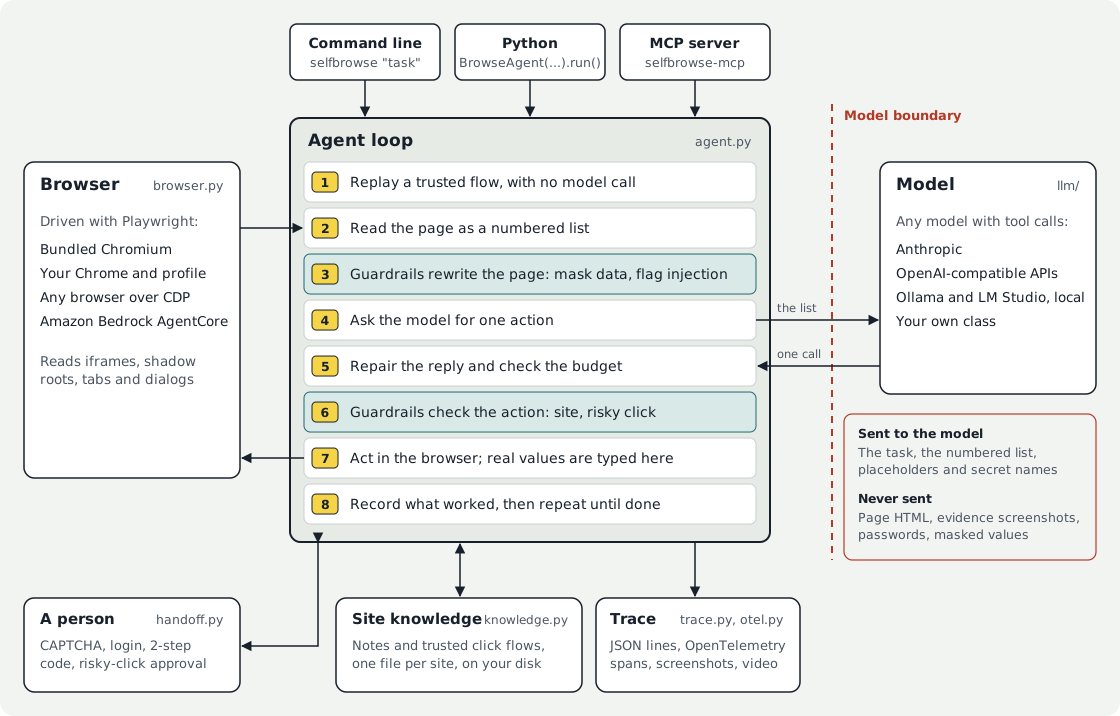
One loop between the browser and the model

Guardrails act twice in every step: on the page before the model reads it, and on the action before the browser runs it. Real values exist only where they are typed.

Selfbrowse architecture. The command line, Python and the MCP server start the agent loop. The loop replays a trusted flow, reads the page from the browser as a numbered list, lets guardrails rewrite the page, asks the model for one action, repairs the reply, lets guardrails check the action, acts in the browser and records what worked. Only the task, the list, placeholders and secret names cross to the model. Site knowledge and traces stay on your machine, and a person can be asked to take over.
The red line is the model boundary. The model, the guardrails, the hand-off, the trace output and the browser can each be replaced with your own. Read the architecture guide

The rest of what ships

Everything here is in the package and turns on with a flag or one line of Python.

Guardrails
Stay on the sites you name, ask before Buy, Pay, Delete or Send, watch page text for injected instructions, and stop at a token, time or dollar budget. Write your own as a small class. Guardrails
Hand-off to a person
When a CAPTCHA, login or 2-step code appears, the run pauses and you finish that step in the browser window. Selfbrowse does not solve CAPTCHAs. Hand-off
Any model
Anthropic, OpenAI, Gemini, Groq, DeepSeek, OpenRouter, Together, Ollama and LM Studio by name. Any gateway that speaks the Anthropic or OpenAI API, or your own model as a small class. Models
A browser for Claude and VS Code
selfbrowse-mcp is an MCP server. The assistant calls browse(task) and gets back only the answer, so pages never enter its context. MCP server
See every prompt
--trace records each model call, reply and action. --otel URL sends OpenTelemetry spans to Jaeger, Phoenix, Langfuse or Tempo, with no code changes. Observability
Evidence of what it did
--screenshots DIR saves a picture after every step with an index page, and --record-video DIR saves a video. The model never gets these images.
Remote browsers
Attach to any browser over CDP with --cdp-url, or start an Amazon Bedrock AgentCore session with --cloud agentcore. Remote browsers
Your Chrome, your profile
--channel chrome --profile DIR uses your installed browser and keeps logins between runs, which gets past many bot checks.

What it does not do yet

Selfbrowse is early software. These are the things we know it does not do well, or have not checked.

  • Not supported yet: file uploads, drag and drop, closed shadow roots, custom dropdowns beyond clicking them, and vision.
  • Hard forms vary. The same Google Flights prompt took 7 steps in one run and more than 30 in two others, so its cost ranged ninefold.
  • Research-style tasks learn little. Most of their clicks are specific to the question.
  • Guardrails reduce risk; they are not guarantees. Pattern matching for personal data and injection misses things, and a hosted model still sees any page text you do not mask.
  • Untested against live accounts: the AgentCore adapter and the Azure and Bedrock model routes are tested with stand-ins.

Run your first task

Install the package and a browser for it to drive, then give it a task. With Ollama there is no key and no cost.

Add --headed to watch it work. There are fourteen runnable scripts in examples, three of which need no API key.

Read the getting started guide

Install

pip install selfbrowse
playwright install chromium

Command line

# a local model through Ollama
selfbrowse -m ollama:qwen3.6:latest "Open news.ycombinator.com and tell me the top story"

# Claude, staying on one site and asking before risky clicks
export ANTHROPIC_API_KEY=your-key-here
selfbrowse --headed --allow-domain example.com --confirm-risky "..."

Python

from selfbrowse import BrowseAgent
from selfbrowse.guardrails import AllowedDomains, RedactPII, Budget

result = BrowseAgent(
    "Find the cheapest desk lamp and add it to the cart",
    llm="ollama:qwen3.6",
    guardrails=[AllowedDomains(["shop.example.com"]), RedactPII(),
                Budget(max_tokens=50_000)],
).run()
print(result.output, result.usage)